Connect With Me

Twitter Button StumbleUpon Button Delicious Button RSS Feed Button
Showing posts with label software. Show all posts

Saturday, December 25, 2010

Free E-Book Resources

Kindle

Merry Christmas! I hope your Yuletide is as filled with family, feasting, and festivities as mine is.  I didn’t include “presents” (or “favors,” just to keep the alliteration going) in that list because presents aren’t what the holiday is about. That said, I enjoy receiving gifts just as much as the next person and this year was no exception as the gifts I received were thoughtful and heartwarming.

A Kindle 3G was part of my bounty this year and I have to say I love having an e-book reader! I didn’t think I would, what with just how much I enjoy physical books; there’s just something so wonderful about the smell and the feel of a printed book.  Even now when using my Kindle I feel a twinge of guilt, as though I’m betraying my childhood dreams of one day having a personal library as vast as the one Belle finds in the Beast’s castle in Disney’s Beauty and the Beast.  Despite my misgivings whenever I pick up the device, I have managed to read no less than three books within the last 72 hours.  I find it easier to read because it’s only ever one page at a time – when I pick up a physical book, I’m wracked with guilt over the time investment the book’s width visually reminds me I will make in reading it.

I have always proselytized the need to read prolifically in order to improve writing skills.  With e-books, doing just that has gotten easier in an increasingly wired world.  The beauty of e-books is that even if you don’t have an e-book reader (After all, they are rather pricey. If mine hadn’t been a gift, I would never have purchased one myself), you can still read e-books on any computer using e-book software. 

Free E-Book Software

E-books come in a variety of different formats (mainly for proprietary and personal preference purposes) and depending on what file type each e-book you download comes in, you may need to also download a software program capable of reading each file type.  The sheer number of different file types can be intimidating, but not to worry, most of these e-book programs support most (if not all) file types, so you’ll only have to download one.

Calibre By far my FAVORITE e-book management software, Calibre supports ALL major file formats, lets you convert from one format to another, is compatible with all eReaders, and is compatible with Windows, Mac, and Linux.  What more could you ask for?
Adobe Digital Editions This software supports PDF and EPUB files, lets you annotate pages, and offers a “library” from which you can download and purchase e-books. 
It has built in support for the Sony Reader and is PC and Mac compatible.
Reader Library Software Sony makes this program and it is fully compatible with all Sony eReaders (of course). It is also PC and Mac compatible.  As far as file type support, the page only mentions the ability to read library books in the software, which means it supports EPUB.
Microsoft Reader Made by Microsoft, this program also has a built in “marketplace” from which you can purchase new e-books.  No information about file type compatibility is provided. It is only PC compatible.
Kindle Reading Apps Amazon.com makes a software program that reads its proprietary file type (.AZW) and .MOBI files. Of course, it allows you to browse Amazon.com for more e-books to purchase and download. PC and Mac compatible.
Borders eReader Apps Supporting the .PDF, .MOBI, and .EPUB file types, this software links you directly to Borders.com’s marketplace for e-book browsing and purchasing. PC and Mac compatible.
Barnes and Noble Nook Apps Barnes and Noble is also getting in on the action with their eReader. It is PC and Mac compatible and supports .EPUB, .PDB, and .PDF files.


If you have Adobe Reader, .pdf files open by default in that program.  For other file types, I like Calibre because it’s hard to beat its simplicity, but feel free to choose the e-book software that’s right for you.  Run a search in Google for “free ebook readers” for other, more obscure  e-book reading software that I left out of this list.

Free E-Book Sources

Now that you have a program that will let you read e-books, it’s time to download some e-books.  My personal favorite genre of e-book is the free kind so here are a few websites (in order of personal preference) to get your free e-book library started.

Hopefully these links will prove useful to you and help you find some reading material that is kind to your wallet this holiday season.  Remember, you don’t need to own a fancy e-book reader to benefit from the abundance of e-books available online.  
Saturday, July 18, 2009

Organizing Your Thoughts: Mind Mapping

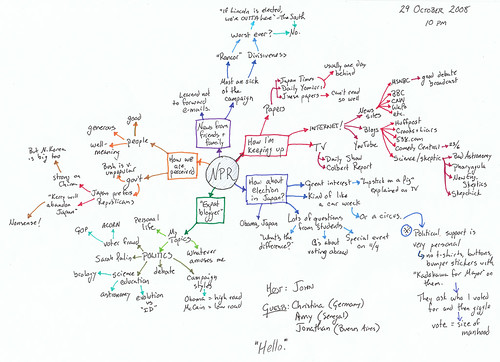
Putting your thoughts down on paper is an activity easier said than done.  I’d like someone to take a peek into my mind and just TRY to get the mess of ideas I have tumbling around in there onto a piece of paper in a coherent, organized fashion. 

If you too have so many ideas bouncing around in your head that you can’t manage to focus on just one, having the right tools at your disposal will make writing that much easier.  One of those tools is called Mind mapping.

Mind Mapping

The motivation behind mind maps is the idea that knowledge is stored in our brains in a non-linear fashion.  The relationships between pieces of information are simply too complex to capture in the traditional left-to-right, top-to-bottom note-taking way.

Mind maps instead focus on a single idea (the center of the map) and information is added radially around it.  This avoids the hierarchy that ordering things in a list creates (for example, if I write a to-do list and include “1. fold laundry, 2. grade essays, 3. walk dogs” on it, folding the laundry  seems to take precedence over walking the dogs). 

Mind mapping can be done with pen and paper, but if you prefer something more advanced, there are plenty of programs available for *free* online.

Mind Mapping Programs


FreeMind This is the first mind mapping program I ever used and it's still my favorite. Check out the screenshots to see its awesomeness! There's a little bit of a learning curve required for this program, but it's well worth the effort.
Bubbl.us This application is hosted online so you don't have to download anything to your computer to use it. Being online also means you can access your mind maps from any computer with an internet connection.


There are many other mind mapping programs and online applications out there (some free, some not free), but these two are the ones I personally prefer over the rest.  If these two just don’t do it for you, you can always run your own search on Google to find one that fits your needs.

Writing well is difficult enough to do without also having to deal with making sense of the jumble of ideas that pop up as part of the writing process.  Take advantage of the tools available to you, whether they be computer programs or pen and paper, and make your task a little bit easier. 


Photo credit: MShades

Tuesday, May 19, 2009

OpenOffice.org: The Free Microsoft Office Alternative

Last week I was appalled to find out that one of my students has been typing up all of his essays on Windows Notepad at home, then hopping on a school computer to copy and paste his work into Microsoft Word so he could format it.

I wasn’t taken aback at the thought of someone using Notepad to write.  It’s actually quite a useful little fuss-free program that’s lack of formatting options allows you to concentrate completely on the meaning of the words you’re writing, instead of what they look like. 

No, what appalled me was the fact that someone was using it because he thought there were no other options. He was actually planning on doling out the couple hundred bucks it costs to purchase Microsoft Office once he saved up enough for it.

No! No, no, no! Put your money away and save it for more important things.  The internet is full of wonderful, FREE programs that will do everything (and sometimes more!) that any software can that you purchase at Fry’s or Best Buy or Microcenter or CompUSA or … (you get the point). 

Buying an expensive program when a perfectly good free alternative exists is just poor financial decision making, especially when we’re in the middle of an economic recession. 

Meet OpenOffice.org

OpenOffice is a free alternative to the entire Microsoft Office Suite. You can download OpenOffice as a bundle of programs that include:

  • Writer
  • Calc
  • Impress
  • Draw
  • Base

As a composition instructor, I’m mainly interested in getting the word out about Writer, a replacement for Microsoft Word.  OpenOffice includes so much more than just a word processor, though.  Calc is basically a replacement for Excel, Impress for PowerPoint, Draw for Photoshop, and Base for Microsoft Works Database. 

Go to Why OpenOffice.org for more information about each program. 

If you do decide to use OpenOffice Writer for your word processing needs, I do have a bit of advice for you: save your documents as Microsoft Word compatible files.  Do this by selecting “Save As” when it’s time to save your file, then scrolling through the list of available options until you find “Microsoft Word 2003.” 

By default, OpenOffice saves documents as .odt files, which can only be opened by OpenOffice.  By saving your files as Word compatible files, you’ll be making your life much easier by making it possible to open your files using other word processing programs.  

There are, of course, other alternatives to OpenOffice.  I’ll mention them later in future posts.  In the meantime, happy word processing!


Photo credit: Andrew Abogado